










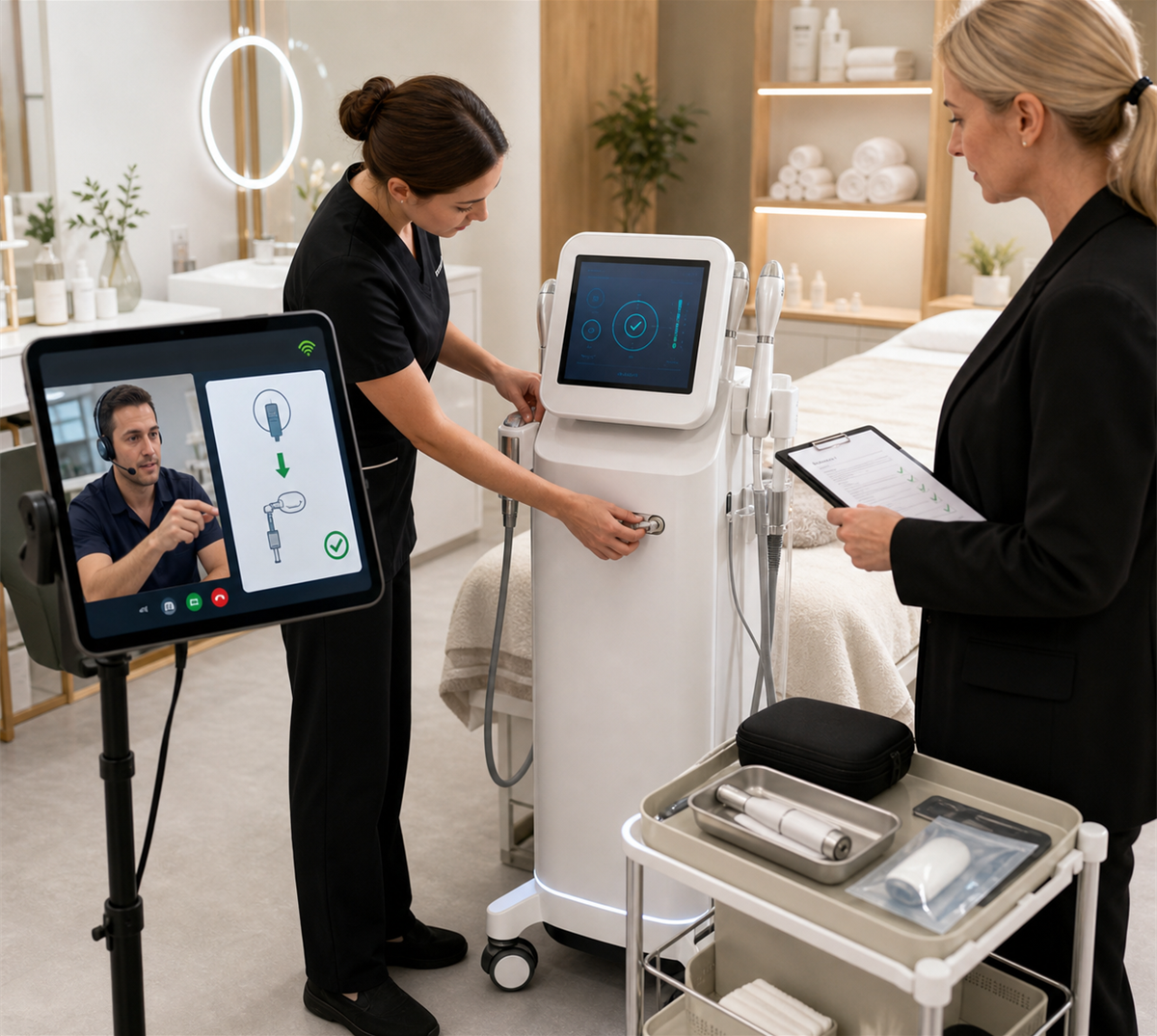
Many beauty equipment suppliers support remote guided repair or remote troubleshooting, but the scope depends on the machine type, fault type, warranty policy, supplier capability, and operator skill. Remote guidance is useful for error code checks, software settings, handle connection issues, consumable installation, filter and tube blockage, simple external part replacement, and operation correction. It is not suitable for every repair.
For beauty salons, remote guidance can reduce downtime and help staff solve simple problems quickly. For distributors, remote support can reduce travel cost, improve service speed, and help end customers feel supported. However, remote guidance must be managed carefully. Some problems involve electrical risk, high energy output, laser or IPL safety, cooling systems, internal wiring, software access, or warranty restrictions. These issues may require trained technicians, on-site service, return to repair center, or factory repair.
The best answer is: yes, beauty equipment may support remote guided repair, but buyers should confirm what can be handled remotely, what cannot, who is authorized to guide the repair, whether warranty remains valid, who pays for parts, and how service records are kept.
What Remote Guided Repair Means
Remote guided repair means the supplier, manufacturer, distributor, or technician helps the salon diagnose or solve equipment problems without being physically present. This may happen through video call, phone call, messaging app, photos, operation videos, remote software access, error code analysis, or step-by-step repair instructions.
Remote support can include:
- Checking error codes.
- Reviewing machine startup and screen settings.
- Confirming handle and probe connections.
- Guiding software language or account settings.
- Helping staff reset a setting.
- Checking whether consumables are installed correctly.
- Guiding filter, tube, bottle, or seal replacement.
- Reviewing cleaning and maintenance steps.
- Asking the salon to send photos or videos of abnormal issues.
- Guiding external accessory replacement if safe and authorized.
- Arranging spare parts shipment after diagnosis.
Remote guided repair is not the same as allowing salon staff to open the machine freely. Internal repair, electrical repair, laser module repair, circuit board replacement, cooling system repair, and performance adjustment may require professional service.
Why Remote Guidance Is Becoming More Common
Remote support has become common because beauty salons and distributors need faster service. A salon cannot wait several weeks for every small issue. Many problems are not true machine defects. They may come from wrong operation, loose handle connection, blocked filters, old consumables, incorrect settings, or software login issues.
Remote guidance helps because it can:
- Shorten response time.
- Reduce unnecessary machine returns.
- Help staff learn correct operation.
- Reduce distributor travel cost.
- Identify whether a spare part is needed.
- Keep a record of the fault before repair.
- Support cross-border buyers.
- Help suppliers serve more customers with fewer technicians.
For example, if a hydro facial machine has weak suction, remote guidance can first check the waste bottle, filter, tube connection, seal, tip, and suction level. If the problem is a blocked filter, the salon may solve it immediately. If the pump is faulty, the supplier can decide whether to send a part or arrange repair.
What Problems Can Usually Be Handled Remotely?
Remote guidance is most suitable for low-risk, visible, external, or software-related issues.
Operation And Setting Problems
Many service cases are caused by incorrect operation. The machine may be normal, but staff choose the wrong mode, wrong handle, wrong timer, wrong intensity, or wrong startup order.
Remote support can help with:
- Startup and shutdown steps.
- Menu settings.
- Treatment mode selection.
- Language setting.
- Time and intensity adjustment.
- Handle recognition process.
- Software login and account setup.
- Error message explanation.
Accessories And Connection Problems
Loose or incorrect connections are common. Remote video guidance can help staff check whether the handle, cable, plug, tube, bottle, filter, or foot switch is installed correctly.
例:
- RF handle not recognized.
- EMS probe has poor contact.
- Vacuum tube connected to the wrong port.
- Hydro facial bottle not sealed.
- Foot switch not responding.
- LED panel cable loose.
- Power cord not fully inserted.
Consumable And External Part Replacement
Some external parts are designed to be replaced by salon staff. Remote guidance can help make replacement easier.
例:
- フィルター。.
- チューブ。.
- ヒント。.
- Bottles.
- Seals.
- Protective covers.
- HIFU cartridge installation.
- IPL lamp cartridge if designed for user replacement.
- Cryolipolysis membrane placement.
- Conductive pad connection.
The key phrase is if designed for user replacement. If a part requires opening the machine or touching internal electrical components, it should not be treated as ordinary remote repair unless the supplier authorizes it and the operator is trained.
Cleaning And Blockage Problems
Water circulation, suction, and solution-based machines often develop weak performance because of blockage, residue, or poor cleaning.
Remote support can guide:
- Tube flushing.
- Bottle cleaning.
- フィルター交換。.
- Waste container inspection.
- Tip cleaning.
- Seal check.
- Pump inlet inspection.
- Correct cleaning schedule.
This is useful for small bubble, hydro facial, oxygen spray, vacuum, body contouring, and water-based systems.
Software And Digital Device Issues
AI skin analyzers, smart beauty machines, app-based devices, and cloud-connected systems may need remote software support.
Remote support can help with:
- Account login.
- Password reset.
- Report export.
- Software update.
- Language package.
- Camera setting.
- Lighting calibration guidance.
- Cloud synchronization.
- Subscription renewal.
- Firmware update if supported.
For software support, salons should control account access and avoid sharing unnecessary customer data.
What Problems Should Not Be Handled Casually By Remote Repair?
Remote support has limits. Some issues require on-site technician service, return to repair center, or factory repair.
Electrical Or Internal Component Repair
If repair requires opening the main unit, touching power supply, circuit board, wiring, capacitor, compressor, laser power supply, cooling module, or internal sensor, the salon should not proceed unless the supplier authorizes it and the operator is properly trained.
Internal repair can create electrical risk, fire risk, performance instability, or warranty disputes.
Laser, IPL, HIFU, And High-Energy Systems
High-energy systems need stricter control. Problems involving output energy, optical window damage, laser module, IPL lamp housing, cooling failure, HIFU transducer, cartridge count, calibration, or abnormal heat should be handled carefully.
Remote guidance may help identify the problem, but it should not encourage untrained staff to modify energy output, bypass sensors, open sealed modules, or continue using a machine with unstable output.
Cooling System Failure
IPL, laser, cryolipolysis, RF, and some body contouring systems depend on cooling. If cooling is unstable, the machine should usually stop until diagnosed. Remote support may check water level, filter, fan, alarm code, and visible blockage, but deeper cooling repair may require professional service.
Repeated Error Codes
If the same error code appears repeatedly after basic checks, remote guidance should move from operation advice to formal service. Continuing to reset and reuse the machine can create customer complaints or equipment damage.
Burn Smell, Smoke, Sparks, Abnormal Heat, Or Exposed Wire
These are stop-use signals. The salon should power off the machine safely, unplug it if appropriate, keep customers away, document the issue, and contact the supplier. Remote support may help record evidence, but the machine should not be used until the issue is resolved.
Unauthorized Modification
Remote guidance should not include bypassing protection, changing safety limits, removing warning systems, modifying software claims, or altering performance beyond manufacturer instructions. For regulated devices, certain changes may raise servicing, remanufacturing, or compliance concerns.
Remote Troubleshooting Is Often Step One, Not The Whole Repair
Professional after-sales service usually follows a staged process.
Step 1: Collect Information
The supplier asks for model, serial number, purchase date, video, photos, error code, usage situation, and maintenance history.
Step 2: Confirm Whether The Issue Is Urgent
If there is smoke, abnormal heat, electrical smell, customer injury, output instability, or high-energy risk, the supplier should tell the salon to stop using the machine.
Step 3: Remote Diagnosis
The technician checks settings, connections, consumables, filters, software, and obvious external issues.
Step 4: Remote Guidance For Safe Actions
The supplier may guide simple steps such as reconnecting a handle, replacing a filter, restarting software, checking water level, cleaning a tube, or installing a user-replaceable accessory.
Step 5: Parts Shipment Or On-Site Repair
If a part is needed, the supplier sends the correct part and instructions, or arranges on-site service.
Step 6: Return To Repair Center Or Factory
If the problem cannot be solved remotely or involves internal components, the machine or part may need to be returned.
Step 7: Service Record And Follow-Up
The service case should be recorded, including issue, diagnosis, action, part used, cost, warranty status, and final result.
This process protects both buyer and supplier.
What Buyers Should Confirm Before Purchase
Before buying beauty equipment, salons and distributors should ask whether remote repair support is available and what it includes.
主な質問事項は以下のとおりです。
- Does the supplier provide remote troubleshooting?
- What support channels are used: video call, phone, email, app, messaging platform, or remote software?
- 応答時間はどれくらいですか?
- Is remote guidance free during warranty?
- Is remote guidance free after warranty?
- Which problems can be solved remotely?
- Which problems require on-site service or return repair?
- Are staff allowed to replace external parts?
- Does remote-guided repair affect warranty?
- Who pays for parts sent after remote diagnosis?
- Are repair videos and manuals provided?
- Is there a Chinese or local language technician?
- Are remote support sessions recorded or documented?
- Can the supplier remotely access software or the device?
- How is customer data protected during remote support?
These questions should be included in the purchase contract, warranty policy, or after-sales service document.
Remote Guidance And Warranty
Remote support can protect warranty if it is provided by the supplier and documented. However, unauthorized repair can damage warranty rights.
購入者は以下を確認してください。
- Who is authorized to guide repair?
- Which parts can salon staff replace?
- Which parts require supplier approval?
- Whether opening the machine voids warranty.
- Whether third-party technicians are allowed.
- Whether the supplier must approve replacement parts.
- Whether videos and photos are required before repair.
- Whether the supplier will provide written confirmation before internal repair.
If the supplier tells the salon to open the machine or replace internal parts, the salon should ask for written authorization first. This helps avoid later disputes.
Remote Guidance And Safety Training
Even remote troubleshooting needs basic training. Staff should not touch electrical parts, open sealed modules, or continue using a machine with abnormal output just because a technician is watching through a video call.
Salons should train staff to:
- Recognize stop-use signals.
- Power off safely.
- Avoid wet hands near plugs or electrical parts.
- Avoid using damaged cables or cracked handles.
- Understand normal and abnormal customer sensations.
- Report errors immediately.
- Keep customers away from faulty equipment.
- Follow cleaning and maintenance instructions.
- Avoid unauthorized disassembly.
For machines that use cleaning chemicals, disinfectants, strong light, heat, current, suction, or cooling, staff should understand related precautions. Remote guidance cannot replace proper training.
Remote Software Access And Data Security
Some smart beauty devices and skin analyzers may allow remote software access. This can help with updates, configuration, report export, cloud issues, or diagnostics. But remote access also creates data security questions.
Salons should manage remote access carefully:
- Use authorized supplier accounts only.
- Avoid sharing personal passwords in open chat.
- Limit access to what is needed for the support case.
- Remove remote access after the service is complete if applicable.
- Do not expose unnecessary customer photos or personal data.
- Keep software updated.
- Use strong passwords and multi-factor authentication where available.
- Record who accessed the system and why.
- Confirm whether the supplier stores or downloads data.
For distributors, remote access policy should be standardized. A casual technician login may solve one problem but create a privacy or trust issue later.
What Tools Make Remote Repair Easier?
Suppliers can improve remote support by providing clear tools and documents.
便利なツールには以下のようなものがあります。
- Error code list.
- Troubleshooting flowchart.
- Operation video library.
- メンテナンスチェックリスト。.
- Consumable replacement guide.
- Spare parts diagram.
- Serial number and model label guide.
- 写真およびビデオ証拠の要件.
- Remote support request form.
- サービスチケットシステム。.
- Parts replacement video.
- 保証請求フォーム.
For salons, keeping these documents in one folder makes remote support faster. Staff should not search for manuals only after the machine fails.
How Salons Should Prepare For A Remote Repair Session
Before a remote support call, the salon should prepare:
- Machine model and serial number.
- Purchase date and warranty status.
- Clear photos of the machine and accessories.
- Short video showing the fault.
- Error code screenshot.
- Description of when the issue started.
- What staff were doing before the fault.
- Maintenance and cleaning records.
- 消耗品交換記録。.
- Stable internet connection.
- A staff member who can safely operate the machine under guidance.
- Power access and treatment room availability.
During the call, staff should follow only the technician’s instructions and stop if anything feels unsafe. After the call, the salon should save the result in a service log.
Which Beauty Equipment Categories Benefit Most From Remote Support?
Small Bubble And Hydro Facial Machines
Remote guidance is useful for weak suction, bottle connection, filter blockage, water flow, tube cleaning, and tip installation.
RF, EMS, And Ultrasound Machines
Remote support can check handle connection, parameter setting, conductive gel use, poor contact, probe issues, and operation sequence. Internal energy repairs should be handled professionally.
IPL And Laser Machines
Remote support can check error codes, cooling alarms, shot count, handle connection, water level, and basic maintenance. Optical, energy, lamp housing, and laser module issues need more caution.
HIFUデバイス
Remote support can check cartridge recognition, line count, cartridge installation, software setting, and error code. Cartridge or transducer problems should follow manufacturer instructions.
Body Contouring And Vacuum Devices
Remote support is useful for suction leakage, seal issues, tube blockage, filter replacement, applicator connection, and error code checks.
Skin Analyzers And AI Devices
Remote support is especially useful for software login, camera settings, light calibration guidance, report export, cloud sync, language settings, and account issues.
How Distributors Can Build A Remote Repair System
Distributors should not rely on random chat support. A professional remote repair system improves customer trust.
A distributor system can include:
- First-response service group.
- Standard fault reporting form.
- Model and serial number database.
- Technician assignment.
- Error code library.
- Remote video diagnosis process.
- 予備部品の在庫。.
- Warranty decision rules.
- Service ticket number.
- Follow-up after repair.
- Monthly analysis of repeated faults.
- Training for sales staff so they do not overpromise.
This system reduces repeated questions and helps distributors identify product quality issues early.
How Manufacturers Can Support Remote Repair
Manufacturers can make remote service easier by designing products and documents with serviceability in mind.
役立つサポート内容は以下のとおりです。
- Clear internal and external part naming.
- User-replaceable part design.
- QRコード付きマニュアル。.
- Built-in error codes.
- Remote diagnostics where appropriate.
- Software update tools.
- Parts diagrams.
- Repair videos for authorized technicians.
- シリアル番号追跡。.
- Service training for distributors.
- Clear distinction between user maintenance and technician repair.
Manufacturers should also define which actions are servicing, which are maintenance, and which may alter performance or safety. This is especially important for regulated or high-energy devices.
What Remote Repair Should Not Promise
Remote repair should not be sold as unlimited or risk-free. Avoid promises such as:
- Any problem can be solved remotely.
- No need for technicians.
- You can open the machine yourself anytime.
- Warranty will always remain valid.
- High-energy parts can be adjusted remotely without risk.
- Error codes can simply be ignored.
- Cooling alarms can be bypassed.
- Any accessory from any supplier can be used.
These promises may create safety, warranty, and reputation problems. A professional supplier explains both capability and limits.
How To Write Remote Support Into The Contract
Remote guidance should be included in the after-sales service terms.
Contract or warranty documents should state:
- Whether remote support is provided.
- Free period and paid period.
- Support hours and response time.
- Communication channels.
- Language of support.
- Fault reporting requirements.
- Scope of remote troubleshooting.
- Actions allowed for salon staff.
- Actions requiring authorized technician.
- Warranty effect of remote-guided actions.
- Parts and shipping cost rules.
- Data access and software support rules.
- Service record requirements.
The clearer the written terms, the fewer disputes later.
避けるべきよくある間違い
The first mistake is treating remote guidance as a substitute for all repairs. It is a first response tool, not a universal solution.
The second mistake is opening the machine without written supplier approval. This can create warranty disputes.
The third mistake is ignoring stop-use signs. Smoke, burning smell, exposed wire, abnormal heat, cooling failure, and unstable energy output should not be treated casually.
The fourth mistake is not keeping records. Without photos, videos, error codes, and service notes, warranty claims become harder.
The fifth mistake is allowing remote software access without data control. Salons should protect customer photos, reports, and personal data.
よくある質問
Can beauty equipment be repaired remotely?
Some problems can be solved through remote guidance, especially settings, connections, error codes, software issues, consumable installation, filters, tubes, and simple external parts. Internal electrical, high-energy, optical, or repeated fault repairs may require on-site or factory service.
Is remote guided repair free?
It depends on the warranty and service policy. Many suppliers provide remote troubleshooting for free during warranty, but parts, shipping, after-warranty support, or on-site service may be charged.
Will remote repair affect warranty?
Remote repair should not affect warranty if it is authorized by the supplier and documented. Unauthorized disassembly, third-party repair, or unapproved parts may void or limit warranty.
What should salons prepare before a remote repair call?
They should prepare model number, serial number, purchase date, error code, photos, videos, maintenance records, consumable records, and a trained staff member who can safely follow instructions.
Which machines need caution with remote repair?
Laser, IPL, HIFU, strong RF, cryolipolysis, high-power body contouring, and machines with internal electrical or cooling system faults need extra caution. Remote diagnosis may be useful, but physical repair should often be done by trained technicians.
結論
Beauty equipment can often support remote guided repair, but the support is not unlimited. Remote guidance is effective for troubleshooting, settings, software, connection issues, consumable replacement, cleaning problems, and some user-replaceable parts. It is not suitable for unsafe internal repair, high-energy module adjustment, unauthorized disassembly, or repeated faults that need professional service.
For beauty salons, remote repair support can reduce downtime and improve staff confidence when it is clear, safe, and documented. For distributors and manufacturers, a structured remote service system can reduce after-sales cost and improve customer loyalty. Before purchase, buyers should ask what remote support includes, what is excluded, who pays for parts and shipping, whether warranty remains valid, and how customer data is protected during remote software access.

























